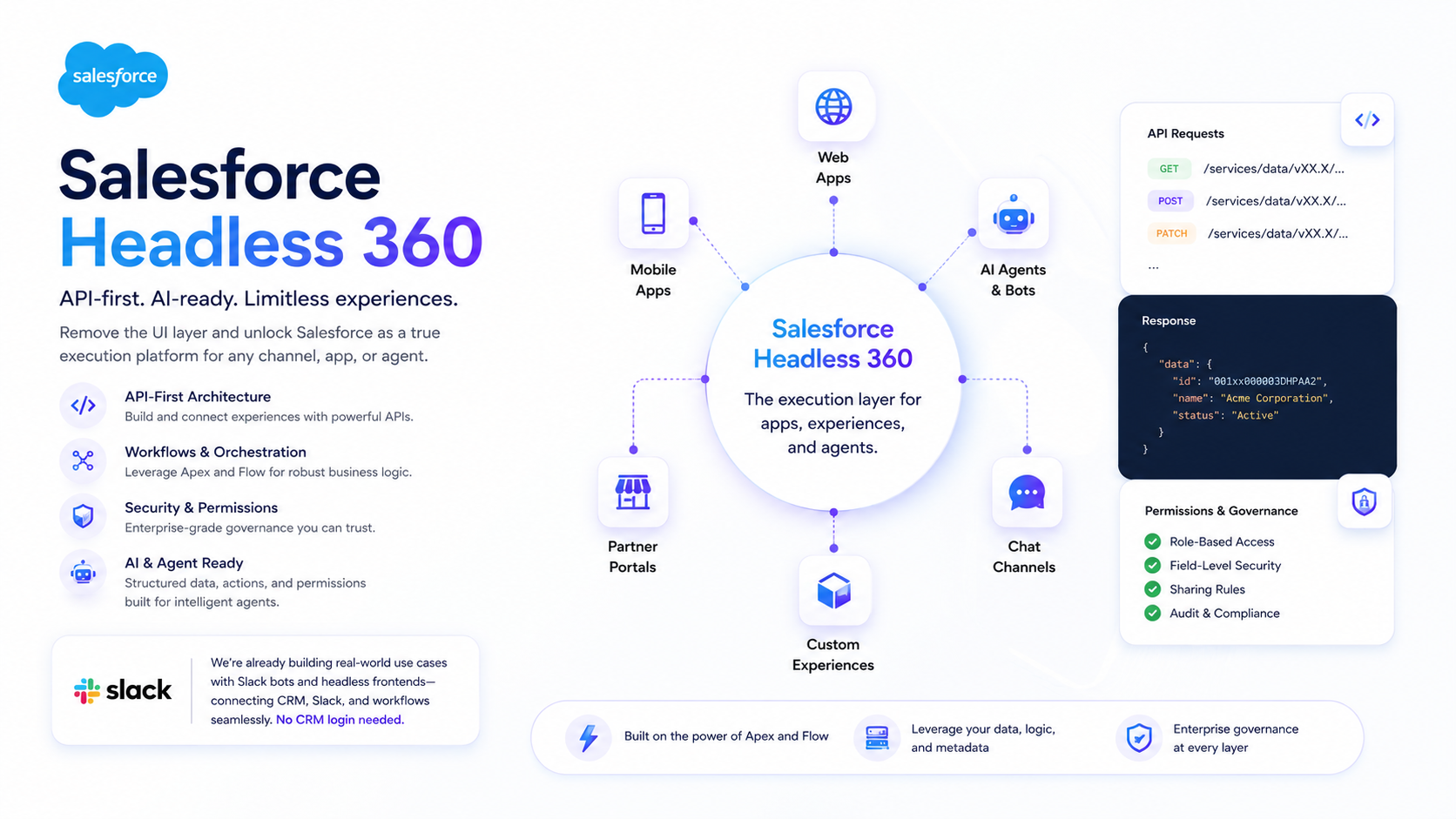
Salesforce recently announced Headless 360 — a shift toward an API-driven, “no-browser-required” CRM model.
This isn’t just about hiding the user interface. It’s about treating Salesforce as a true execution engine and data service for everything from websites to AI agents.
Summary
Headless 360 makes Salesforce a true API-first CRM execution layer.
That unlocks:
- Slack/Teams workflows that create and update records without a UI.
- AI agents that can safely trigger bounded Salesforce actions (Flows, Apex, CPQ steps).
- Custom frontends (web, mobile, portals) that reuse Salesforce governance and data.
If you’re mapping this to commerce architecture patterns, our baseline guide on headless commerce architecture is the closest mental model.
For the commerce platform context behind those API patterns, use the Salesforce Commerce Cloud guide.
Quick answers
What is Salesforce Headless 360?
An approach where Salesforce capabilities are exposed as APIs/CLI/MCP tools so experiences can run in Slack, custom apps, or AI agents without relying on the Salesforce UI.
Why does it matter?
It moves Salesforce closer to an execution engine that humans and bots can call, while still enforcing sharing rules, permissions, and auditability.
Imagine never logging into Salesforce UI for routine work again: instead, Salesforce actions are exposed as API calls and developer tooling that can be invoked from Slack, custom apps, or agents. In practice, this means developers can build front ends in any modern framework or interface (websites, mobile apps, messaging apps like Slack or Teams, even AI agents) while Salesforce handles the data, workflows, and security in the backend.
In plain terms, Headless 360 makes Salesforce the “brain”, and all user experiences — human or machine — are plug-ins via code.
For example, a custom B2B commerce storefront or a Slackbot can now call Salesforce workflows and Apex logic directly. The result is a truly API-first CRM that’s better suited for AI-driven, agentic workflows.
Below, we break down what this means for developers, AI agents/Slackbots, and admins, and share our own Slack & Commerce use case.
What Exactly is Headless 360?
API-first CRM
Every part of Salesforce — objects, processes, even UI actions — can now be invoked by code.
Salesforce calls this:
- “Everything on Salesforce is now an API, MCP tool, or CLI command.”
MCP tools and coding “skills”
Salesforce positions this as:
- 60+ MCP tools
- 30+ preconfigured coding “skills”
These are designed to let coding agents (Codex, Claude, Cursor, Windsurf, etc.) interact with your org through governed actions.
That means you can give an agent an intent in natural language and have it translate into bounded platform actions (query data, update records, run workflows).
No browser required
By decoupling the frontend, humans and agents can work without Salesforce UI.
Instead, they use:
- Slack
- mobile apps
- custom web apps
- AI prompts
Essentially, Salesforce is becoming a headless platform.
Think of it like headless commerce: the backend (data/workflows) is separated from the frontend (UI or agent interface). Now the “front end” could be a React app, a Slack conversation, or an AI agent script.
This is a big deal for the Salesforce ecosystem. It means customers can leverage Salesforce in more flexible ways (their own branded apps or interfaces) and build intelligent assistants on top of real-time CRM data.
Benefits for Developers
Headless 360 opens up Salesforce development in exciting ways.
Any framework, any UI
Developers can build front ends using React, Vue, mobile native, or even headless e-commerce platforms, and simply talk to Salesforce via APIs.
You’re no longer bound by Lightning Components or the standard CRM UI.
Leverage existing Salesforce power
Under the hood, Apex classes, Flows, and existing integrations still run core business logic.
They just get triggered by API calls instead of button clicks.
New MCP tools for automation
The expanded set of developer tools (MCP commands and CLI features) means scripts and AI bots have first-class ways to:
- query records
- run Flows
- execute Apex snippets
A coding assistant can generate code that uses the Salesforce CLI to deploy metadata, or call custom Apex via an API.
Easier AI integration
AI models and agents love structured data and clear APIs.
Headless 360 makes it straightforward for a Slackbot or AI assistant to:
- fetch customer info
- update an opportunity
- generate a report
without any screen-scraping or manual steps.
Key takeaway: developers get unprecedented freedom.
You can spin up a new user experience anywhere — a custom portal, mobile app, or messaging platform — and simply connect it to Salesforce’s data and processes.
All the heavy lifting (security, workflows, approvals) stays in Salesforce.
AI Agents and Slackbots Get Superpowers
The most talked-about aspect of Headless 360 is how it empowers AI agents and next-gen interfaces.
Agentic workflows
In an “agentic enterprise,” AI assistants can act on behalf of users.
They don’t need clickable pages. They need APIs and well-defined actions.
Headless 360 now exposes Salesforce capabilities in exactly that form.
An AI prompt can translate into API calls, without a human ever opening Salesforce.
Structured actions (governance-friendly)
AI agents require clear, bounded actions.
Salesforce’s Apex, Flows, and CPQ processes already encapsulate business logic.
Headless 360 lets an agent trigger those flows directly (via REST or the new CLI tools) and handle results, creating a safe, governed way for AI to operate on your data.
Slackbot & messaging integrations
Salesforce is positioning Slack as an “agentic work OS.”
With Headless 360, Slackbots or Teams bots can orchestrate multi-step workflows.
Example:
- a sales rep types: “Create renewal opportunity for Acme Corp”
- the bot (using Headless 360 APIs) executes all the Salesforce steps under the hood
No need for the rep to log into Salesforce at all.
Omni-channel processes
Workflows can span Slack, mobile, and other channels.
A customer support chat could trigger a Service Cloud Flow.
An AI agent could summarize customer data in Slack and then call an Opportunity update API.
Headless 360 ensures the data remains synchronized and secure.
Key takeaway: AI and automation thrive on Headless 360.
Instead of forcing agents to work around UIs, Salesforce is giving them direct hooks into the platform.
This transforms CRMs from “software humans use” into “services humans and machines use together.”
Real-World Slack and Commerce Use Case
At Tailored Intelligence, we’re already experimenting with headless concepts in Slack and B2B Commerce.
Slack-powered workflows
We built Slackbots that pull CRM and Commerce Cloud data into Slack channels.
For instance, a sales rep can ask our Slackbot for the latest quote or order status on an account.
The bot uses Salesforce APIs to fetch the data and post it in Slack.
With Headless 360, this becomes even more seamless: the same Salesforce Flows and Apex we use can be invoked via Slack commands — no manual CRM login required.
Headless B2B commerce site
The operating model differs from B2C storefront delivery; our B2B and B2C Commerce comparison explains the platform boundaries.
Our team has developed headless storefronts on Commerce Cloud using Lightning or other front-end frameworks.
We connect these front ends to Salesforce via APIs.
Headless 360 means we can reuse those API calls or even call Commerce Cloud functions directly from any interface.
Example:
- a customer places an order on a headless commerce site
- a Salesforce Flow is triggered via API
- it updates inventory or notifies the sales team
All headlessly.
Unified workflows and permissions
All these pieces (CRM data, commerce transactions, Slack interactions) are tied together by Salesforce’s backend logic.
Permissions, validation rules, and data models live in Salesforce.
So even though users may never open Salesforce UI, everything is still governed by Salesforce’s security and audit trail.
For example, the Slackbot checks your Salesforce role before letting you see certain customer data.
No CRM login needed (but still governed)
Many employees now do a lot of their work directly in Slack or specialized apps.
Thanks to headless integrations, they don’t have to remember passwords or navigate the CRM.
They just interact with familiar tools, while Salesforce quietly handles the data processing.
Key takeaway: Headless 360 brings the power of Salesforce behind any interface you choose.
What Doesn’t Change: Apex, Flow, and Governance
A common question is: if everything is headless, do we still need Apex and Flow?
Yes.
Headless 360 relies on your existing business logic.
Apex & Flow remain crucial
You still write:
- Apex triggers/classes
- Flows
to enforce business rules, calculate values, and integrate with other systems.
Headless 360 changes how these processes are invoked: API/MCP/CLI calls instead of button clicks.
Complexity moves, doesn’t vanish
Going headless doesn’t magically simplify your system.
It shifts complexity to API design and architecture:
- endpoint design
- authentication
- data contracts
Good architecture becomes even more important, since anything can call your services.
Data modeling and security still matter
As more experiences touch your data (mobile apps, Slackbots, partner portals), it’s vital to have:
- a robust data model
- strict permission controls
Salesforce’s sharing rules and permission sets are still the gatekeepers, even for headless calls.
Monitoring and auditing become more important
With fewer UI clicks, you’ll want to track API usage and agent actions carefully.
Salesforce’s event logs and API usage dashboards become key tools for admins.
Key takeaway: Headless 360 is powerful, but it requires careful planning.
Admins and Architects: Shifting Roles
For Salesforce admins and solution architects, Headless 360 means evolving responsibilities.
Less UI, more systems design
Admins traditionally configure page layouts and Lightning apps.
Now they’ll spend more time designing:
- API flows
- data models
- agent permissions
Think of Salesforce as a service bus and pick the right integration points.
Cross-team coordination becomes normal
You’ll likely work closely with front-end developers and AI experts.
Example:
- an admin defines the Salesforce Flow and permissions
- a developer builds a Slackbot that calls that Flow via API
Security and compliance get stricter
Exposing APIs broadly means admins must enforce:
- OAuth scopes
- connected app policies
- row-level security
Make sure only authorized bots or apps can call sensitive operations.
Training & support shifts to new interfaces
End users might not even log in to Salesforce UI.
Instead, they interact via Slack or custom apps.
Admins should help train the team on these new experiences (like “how to talk to the Slackbot”).
Key takeaway: the admin role evolves toward systems architecture.
Conclusion: A Bold Step into the Agentic Era
Salesforce Headless 360 is more than a feature — it’s a paradigm shift.
By exposing its entire platform as services, Salesforce is preparing for an era where AI assistants, Slackbots, and custom UIs are first-class citizens of the CRM.
For developers, this means freedom to build with any technology.
For AI and Slackbot use cases, it means true integration and automation without kludges.
For admins and architects, it means stronger focus on system design, data, and governance.
In a world where companies want smarter, faster workflows and fewer clicks, Headless 360 gives Salesforce customers an important advantage.
At Tailored Intelligence, we’re excited about these possibilities — and already putting some into practice.
Sources
- https://www.salesforce.com/news/stories/salesforce-headless-360-announcement/
- https://trailhead.salesforce.com/content/learn/modules/salesforce-headless-360-quick-look/get-to-know-salesforce-headless-360
FAQ
Does headless mean “no Salesforce UI forever”?
No. Headless means the UI is optional. Many teams will still use the UI for admin setup, troubleshooting, and edge cases, while day-to-day execution shifts into Slack and purpose-built apps.
What’s the biggest risk with headless + agents?
Poorly defined actions. AI agents need bounded, governed actions (Flows/APIs with clear contracts) and observability so you can audit and roll back.
Where should teams start?
Start with one workflow that is already well-defined (for example, create a renewal opportunity, share order status, run a support triage flow). Then harden the API contract, permissions, and logging.
Posted by Beenu, Tailored Intelligence